
Structure your recon files before they become unstructured

If, during the recon phase, you catch yourself thinking that the way you organize your files can easily be lost and get out of hand, this is the perfect time to consider building a new habit of structuring your files. This way, even as the list of files grows exponentially on your hard drive, it remains manageable. Meaning you can continue to use files in your reconnaissance process, ensuring they remain logical, clear, and structured without creating a mess and a reason to do it all over again. From my past experience, I learned that the best way to stay well-organized and follow the same pattern would be to create a rule, or, better yet, a tool to reduce repetitive steps.
Welcome a 🐛 “bbounty” ! [Clap-clap-clap]
🔗 https://github.com/paractmol/bbounty
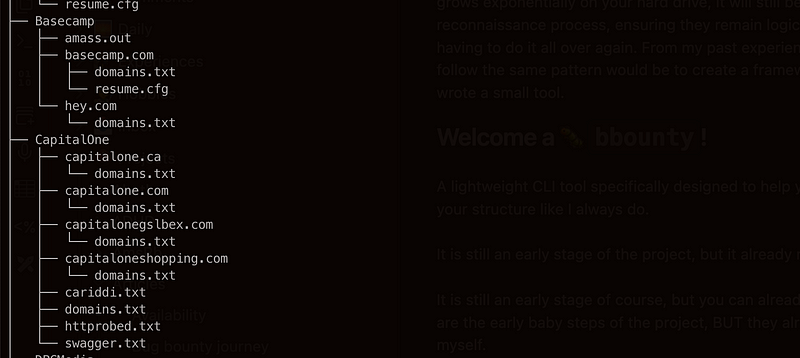
A lightweight CLI tool specifically designed to help you stay organized and prevent you from making a chaos in your structure, like it always happen to me. Even though the project is still in its early stages, it has already made an impact on my folder structure, which is a big win for me.
Installation
The other reason I chose to make it with Golang is that it’s so effortless to install. I don’t have to copy-paste my functions to any AWS instance or droplet I am going to spin up. All I need is just to run the following command.
go install -v github.com/paractmol/bbounty@latestThe usage
Now, I don’t need to create all these folders manually, and with a cherry on top, — easy to find the particular finding you’re looking for, just run:
~ ❯ bbounty add -p bbp -n HackerOne
Enter domain names (press Enter to finish):
hackerone.com
hackertwo.com
And it magically creates the following structure
❯ tree bbp -n 3
bbp
└── HackerOne
    ├── hackerone.com
    │   └── domains.txt
    └── hackertwo.com
        └── domains.txt
Then, magically executes the subfinder -d %s — all | tee domains.txt command and creates domains.txt for you. With the recent changes, I have added support that lets you assign your own command in the ~/.config/bbounty/config.yml. So no need to think I didn’t think of you! Now you can change it to whatever command you like. For that by the way, I wouldn’t mind you like the article and this CLI tool on Github.
Why did I do it?
Oh, it’s very straightforward, really! 🤗 I bet many people write their own Bash or Fish functions for that. I’ve decided to take it a step further and make it a tool. The inspiration for this method comes from Behrouz Sadeghipour videos on YouTube, as I found it to be a perfect way to follow the logical steps for further reconnaissance. And the best part is after a week or two, it still makes sense!
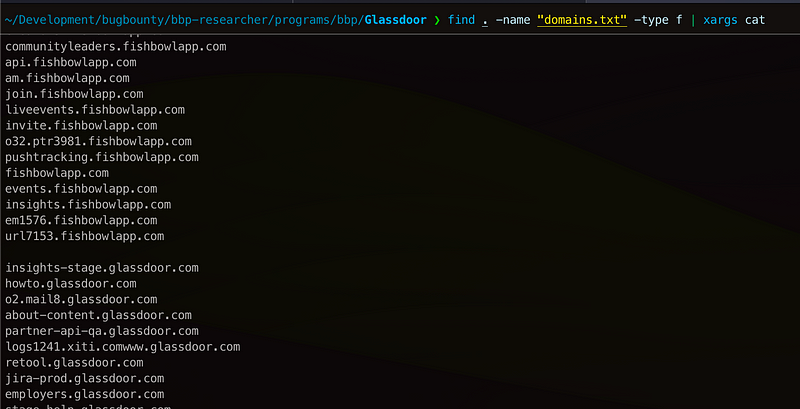
And just in case you missed the point of structuring your programs this way.
find . -name "domains.txt" -type f | xargs catNow that every program inside its own domain directory contains all the subdomains listed in domains.txt, you can effortlessly zoom in or out to a certain level.
So now that all of your files are in order — happy reconnaissance, folks!
If you have ideas about what you’d like to add, don’t hesitate to get in touch with me! Or, even better, feel free to fork it and add features yourself. I’m using the tool to skip boring, repetitive steps, and I’m quite happy so far, as it allows me to focus on things that excite me the most and save precious time.
— Cheers! 👋